External Trigger
Supported on DELTA-01 and DELTA-10. Use an external input to capture one frame, a fixed number of frames, or a continuous stream.
Connect the input
Use the right-hand rear SMA port on DELTA-01, or M8 pin 2 (Trigger In) on DELTA-10. See Camera Interfaces for the connector diagrams.
| Signal-generator setting | Value |
|---|---|
| Amplitude | 1.8 V peak-to-peak: 0–1.8 V |
| Offset | 0.9 V |
| Frequency | Required trigger rate |
| Duty cycle | 50% |
| Waveform | Square wave |
Capture setup
- In DVS Viewer, stop acquisition and recording, then open Sensor Settings.
- Under External trigger, choose Single, Burst, or Burst single.
- Set Trigger condition to Rising edge, Falling edge, or Any edge. For Burst single, also set Frames per trigger.
- Start acquisition. The sensor waits for the selected input condition.
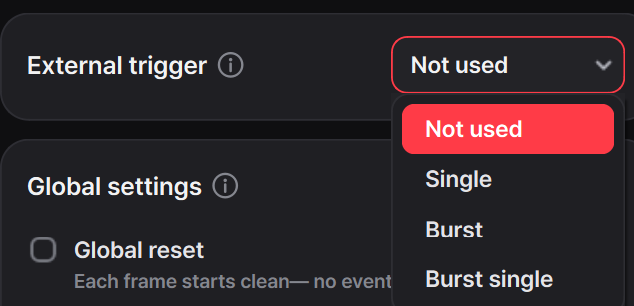
With Any edge, both transitions count: a square wave at f Hz produces 2 × f trigger edges per second. Allow a complete frame or burst to finish before the next selected edge; an early trigger can cut off late-read columns.
Timestamp and frame index
With acquisition and recording stopped, choose Timestamp or Frame index under External trigger → Metadata. This changes the metadata attached to the sensor data, not the trigger condition or the number of frames captured.
| Metadata mode | What it records | Use it for |
|---|---|---|
| Timestamp | Elapsed sensor time | Measuring capture times and intervals |
| Frame index | Sensor capture counters | Identifying capture order and comparing trigger responses |
Timestamp is generated by the sensor; it is not the time when USB data reaches the computer. Its time scale depends on the configured sensor clock and counter units.
Frame index identifies capture order; it is not a duration. In Single mode, it advances for each captured frame. For burst capture, interpret it together with the selected mode and frames per trigger.
Capture timing
Choose a capture mode
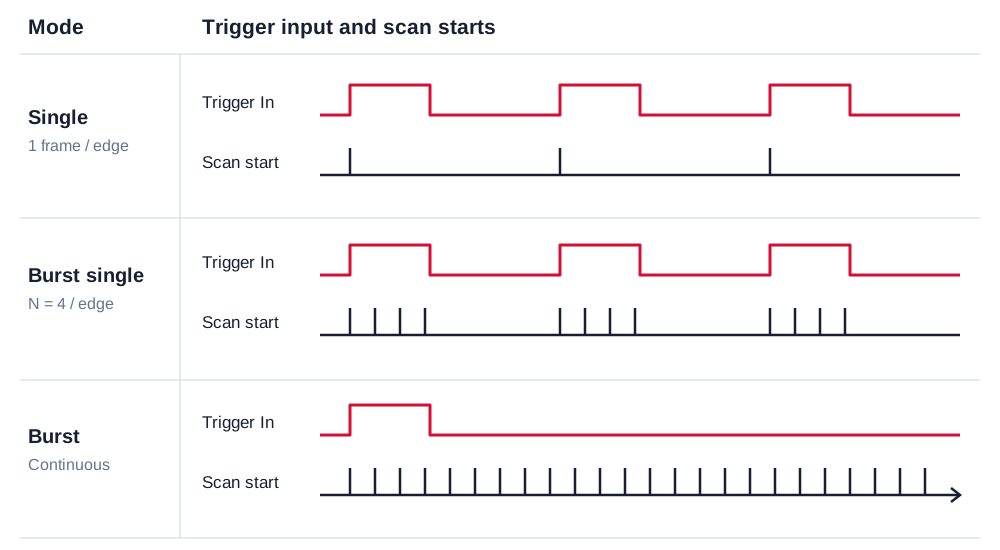
Single — one frame per trigger
Select Single in the Viewer. Each selected input edge captures one frame, then the sensor waits for the next edge. Use it to align individual frames with an external device or periodic signal.
Burst — continuous capture after one trigger
Select Burst. The first selected edge starts continuous capture; further edges are not needed to keep it running. Stop acquisition in the Viewer to end capture.
Burst single — a fixed number of frames per trigger
Select Burst single and enter Frames per trigger. Each selected edge captures that number of frames, then the sensor waits for the next edge. Leave enough time for the complete burst before sending another trigger.
Select the input condition
Choose Trigger condition in the Viewer:
| Condition | Responds to |
|---|---|
| Rising edge | Low-to-high transition |
| Falling edge | High-to-low transition |
| Any edge | Both transitions |
Global Reset and Global Hold
The Viewer applies the capture settings for the selected trigger mode. Single and Burst single use Global Reset with Global Hold; Burst keeps Global Reset disabled for continuous capture.
Global Reset synchronizes the pixels' brightness-reference update, while Global Hold fixes their measured event states at one instant. These sensor-internal functions are separate from the external trigger, which aligns the start of a frame with the input signal.