DELTA_Save
DELTA_Save stores raw live stream data or generated frame images. Raw saving writes .dvs files from a live Delta series camera, and frame saving writes generated BMP image frames from either live streaming or playback.
Back to API overview.
Typical flow
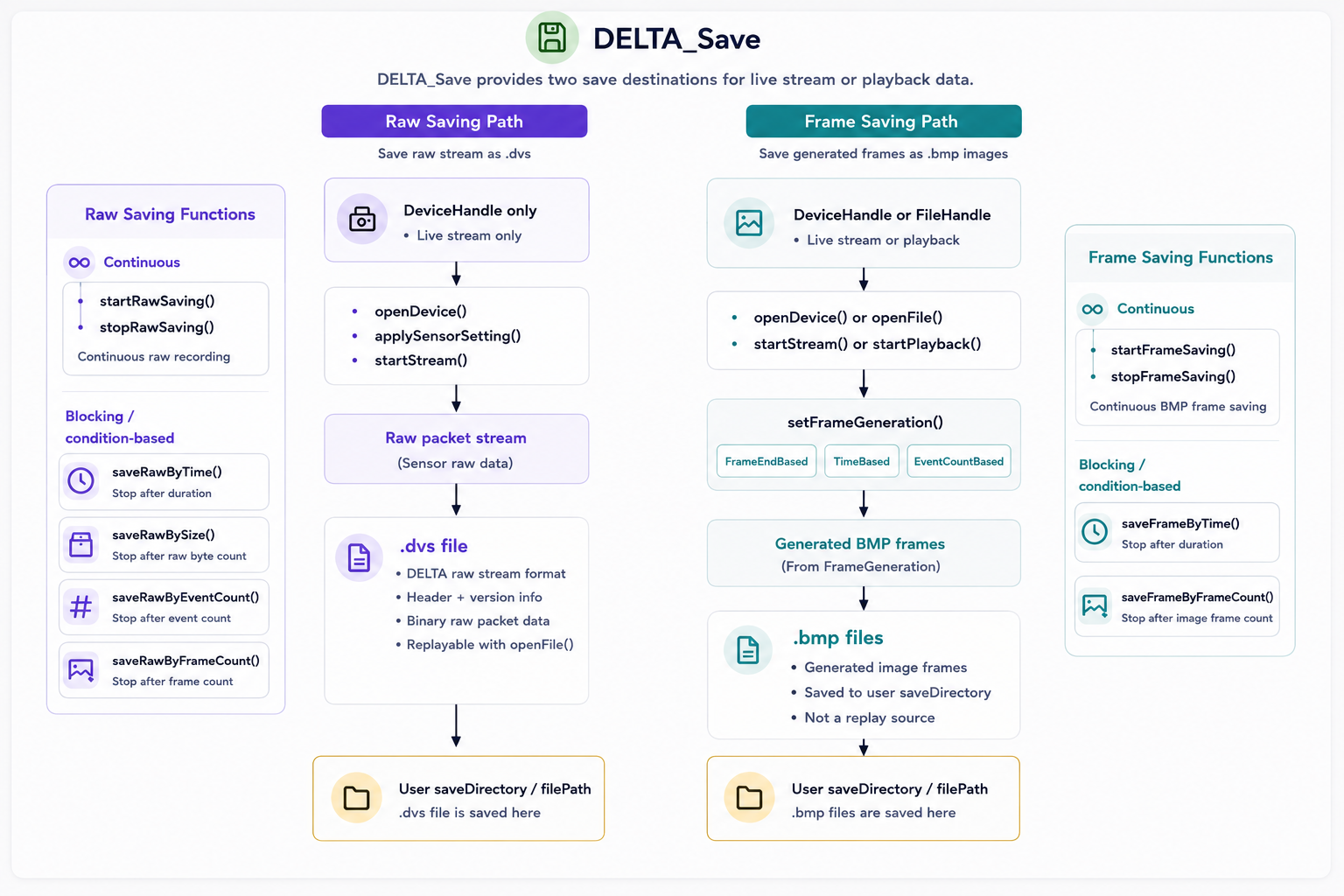
Raw saving requires a live DeviceHandle and must be used after startStream(). Frame saving accepts InputSource*, so it can save generated frames from either startStream() or startPlayback().
Functions
| Function | Purpose |
|---|---|
startRawSaving() |
Start continuous raw .dvs saving from a live Delta series camera. |
stopRawSaving() |
Stop continuous raw data saving. |
saveRawByTime() |
Save raw data for a fixed duration. |
saveRawBySize() |
Save raw data until a target byte count is reached. |
saveRawByEventCount() |
Save raw data until a target event count is reached. |
saveRawByFrameCount() |
Save raw data until a target frame count is reached. |
startFrameSaving() |
Start continuous generated BMP frame saving. |
stopFrameSaving() |
Stop generated BMP frame saving. |
saveFrameByTime() |
Save generated BMP frames for a fixed duration. |
saveFrameByFrameCount() |
Save generated BMP frames until a target frame count is reached. |
Function reference
Status startRawSaving(DeviceHandle handle, const char* saveDirectory);
Starts saving raw device data to the specified directory. Saved raw files use the .dvs format and can be opened later with openFile().
Use when: After startStream() when the application needs continuous raw recording.
Parameters
| Name | Type | Direction | Description |
|---|---|---|---|
handle |
DeviceHandle |
Input | Device handle returned by openDevice(). |
saveDirectory |
const char* |
Input | Directory where raw data will be saved. |
Returns
| Value | Meaning |
|---|---|
Status::Success |
Raw saving started successfully. |
| Error status | Raw saving could not be started. Pass the status to getStatusMessage() for details. |
Example
delta::Status status = delta::startRawSaving(device, "recordings");
if (status != delta::Status::Success) {
    std::cout << delta::getStatusMessage(status) << std::endl;
}
Status stopRawSaving(DeviceHandle handle);
Stops raw data saving for the opened Delta series camera.
Use when: After startRawSaving() when continuous raw recording should end.
Parameters
| Name | Type | Direction | Description |
|---|---|---|---|
handle |
DeviceHandle |
Input | Device handle returned by openDevice(). |
Returns
| Value | Meaning |
|---|---|
Status::Success |
Raw saving stopped successfully. |
| Error status | Raw saving could not be stopped. Pass the status to getStatusMessage() for details. |
Example
delta::Status status = delta::stopRawSaving(device);
if (status != delta::Status::Success) {
    std::cout << delta::getStatusMessage(status) << std::endl;
}
Status saveRawByTime(DeviceHandle handle,
                     const char* saveDirectory,
                     std::int32_t durationMs);
Saves raw device data for the specified duration. This function blocks until saving completes.
Use when: After startStream() to record a fixed-duration .dvs file.
Parameters
| Name | Type | Direction | Description |
|---|---|---|---|
handle |
DeviceHandle |
Input | Device handle returned by openDevice(). |
saveDirectory |
const char* |
Input | Directory where raw data will be saved. |
durationMs |
std::int32_t |
Input | Saving duration in milliseconds. |
Returns
| Value | Meaning |
|---|---|
Status::Success |
Raw data was saved successfully. |
| Error status | Raw data could not be saved. Pass the status to getStatusMessage() for details. |
Example
delta::Status status = delta::saveRawByTime(device, "recordings", 5000);
if (status != delta::Status::Success) {
    std::cout << delta::getStatusMessage(status) << std::endl;
}
Status saveRawBySize(DeviceHandle handle,
                     const char* saveDirectory,
                     std::uint64_t bytes);
Saves raw device data until the accumulated raw packet byte count reaches the specified value. This function blocks until saving completes.
Use when: After startStream() to record a .dvs file with a target raw byte count.
Parameters
| Name | Type | Direction | Description |
|---|---|---|---|
handle |
DeviceHandle |
Input | Device handle returned by openDevice(). |
saveDirectory |
const char* |
Input | Directory where raw data will be saved. |
bytes |
std::uint64_t |
Input | Target raw packet byte count. |
Returns
| Value | Meaning |
|---|---|
Status::Success |
Raw data was saved successfully. |
| Error status | Raw data could not be saved. Pass the status to getStatusMessage() for details. |
Example
delta::Status status = delta::saveRawBySize(device, "recordings", 1024 * 1024 * 100);
Status saveRawByEventCount(DeviceHandle handle,
                           const char* saveDirectory,
                           std::uint64_t events);
Saves raw device data until the streamed event count reaches the specified count. This function blocks until saving completes.
Use when: After startStream() to record until a target event count is reached.
Parameters
| Name | Type | Direction | Description |
|---|---|---|---|
handle |
DeviceHandle |
Input | Device handle returned by openDevice(). |
saveDirectory |
const char* |
Input | Directory where raw data will be saved. |
events |
std::uint64_t |
Input | Target event count. |
Returns
| Value | Meaning |
|---|---|
Status::Success |
Raw data was saved successfully. |
| Error status | Raw data could not be saved. Pass the status to getStatusMessage() for details. |
Example
delta::Status status = delta::saveRawByEventCount(device, "recordings", 1000000);
Status saveRawByFrameCount(DeviceHandle handle,
                           const char* saveDirectory,
                           std::uint64_t frames);
Saves raw device data until the streamed frame count reaches the specified count. This function blocks until saving completes.
Use when: After startStream() to record until a target frame count is reached.
Parameters
| Name | Type | Direction | Description |
|---|---|---|---|
handle |
DeviceHandle |
Input | Device handle returned by openDevice(). |
saveDirectory |
const char* |
Input | Directory where raw data will be saved. |
frames |
std::uint64_t |
Input | Target frame count. |
Returns
| Value | Meaning |
|---|---|
Status::Success |
Raw data was saved successfully. |
| Error status | Raw data could not be saved. Pass the status to getStatusMessage() for details. |
Example
delta::Status status = delta::saveRawByFrameCount(device, "recordings", 300);
Status startFrameSaving(InputSource* handle,
                        const char* saveDirectory,
                        FrameGeneration generation);
Starts saving generated frame images as BMP files using the selected frame generation setting. This function applies generation through setFrameGeneration(), replacing the input source's active frame generation setting. That change is not reverted when saving stops, so call setFrameGeneration() again afterward if the application needs to restore the previous setting.
Use when: After startStream() or startPlayback() when the application needs continuous BMP frame output.
Parameters
| Name | Type | Direction | Description |
|---|---|---|---|
handle |
InputSource* |
Input | Input source handle returned by openDevice() or openFile(). |
saveDirectory |
const char* |
Input | Directory where frame images will be saved. |
generation |
FrameGeneration |
Input | Frame generation mode and parameter. |
Returns
| Value | Meaning |
|---|---|
Status::Success |
Frame saving started successfully. |
| Error status | Frame saving could not be started. Pass the status to getStatusMessage() for details. |
Example
delta::Status status = delta::startFrameSaving(
    source,
    "frames",
    delta::frameEndBased(33)
);
Status stopFrameSaving(InputSource* handle);
Stops frame image saving for the opened input source.
Use when: After startFrameSaving() when continuous BMP frame saving should end.
Parameters
| Name | Type | Direction | Description |
|---|---|---|---|
handle |
InputSource* |
Input | Input source handle returned by openDevice() or openFile(). |
Returns
| Value | Meaning |
|---|---|
Status::Success |
Frame saving stopped successfully. |
| Error status | Frame saving could not be stopped. Pass the status to getStatusMessage() for details. |
Example
delta::Status status = delta::stopFrameSaving(source);
if (status != delta::Status::Success) {
    std::cout << delta::getStatusMessage(status) << std::endl;
}
Status saveFrameByTime(InputSource* handle,
                       const char* saveDirectory,
                       std::int32_t durationMs,
                       FrameGeneration generation);
Saves generated frame image data for the specified duration using the selected frame generation setting. This function blocks until saving completes. Like startFrameSaving(), it applies generation through setFrameGeneration(), and that change persists after saving stops.
Use when: After startStream() or startPlayback() to save BMP frames for a fixed duration.
Parameters
| Name | Type | Direction | Description |
|---|---|---|---|
handle |
InputSource* |
Input | Input source handle returned by openDevice() or openFile(). |
saveDirectory |
const char* |
Input | Directory where frame images will be saved. |
durationMs |
std::int32_t |
Input | Saving duration in milliseconds. |
generation |
FrameGeneration |
Input | Frame generation mode and parameter. |
Returns
| Value | Meaning |
|---|---|
Status::Success |
Frame images were saved successfully. |
| Error status | Frame images could not be saved. Pass the status to getStatusMessage() for details. |
Example
delta::Status status = delta::saveFrameByTime(
    source,
    "frames",
    5000,
    delta::timeBased(16)
);
Status saveFrameByFrameCount(InputSource* handle,
                             const char* saveDirectory,
                             std::uint64_t frameCount,
                             FrameGeneration generation);
Saves generated frame image data until the number of saved image frames reaches the specified frame count. This function blocks until saving completes. Like startFrameSaving(), it applies generation through setFrameGeneration(), and that change persists after saving stops.
Use when: After startStream() or startPlayback() to save a fixed number of BMP frames.
Parameters
| Name | Type | Direction | Description |
|---|---|---|---|
handle |
InputSource* |
Input | Input source handle returned by openDevice() or openFile(). |
saveDirectory |
const char* |
Input | Directory where frame images will be saved. |
frameCount |
std::uint64_t |
Input | Number of image frames to save. |
generation |
FrameGeneration |
Input | Frame generation mode and parameter. |
Returns
| Value | Meaning |
|---|---|
Status::Success |
Frame images were saved successfully. |
| Error status | Frame images could not be saved. Pass the status to getStatusMessage() for details. |
Example
delta::Status status = delta::saveFrameByFrameCount(
    source,
    "frames",
    300,
    delta::frameEndBased(33)
);