DELTA_Playback
DELTA_Playback opens raw data files saved by DELTA_Save and uses them as data input sources for DELTA_Processing. While DELTA_LiveStream is used to receive data in real time, playback is designed to replay saved data so applications can debug and inspect the same data in multiple output formats.
Back to API overview.
Typical flow
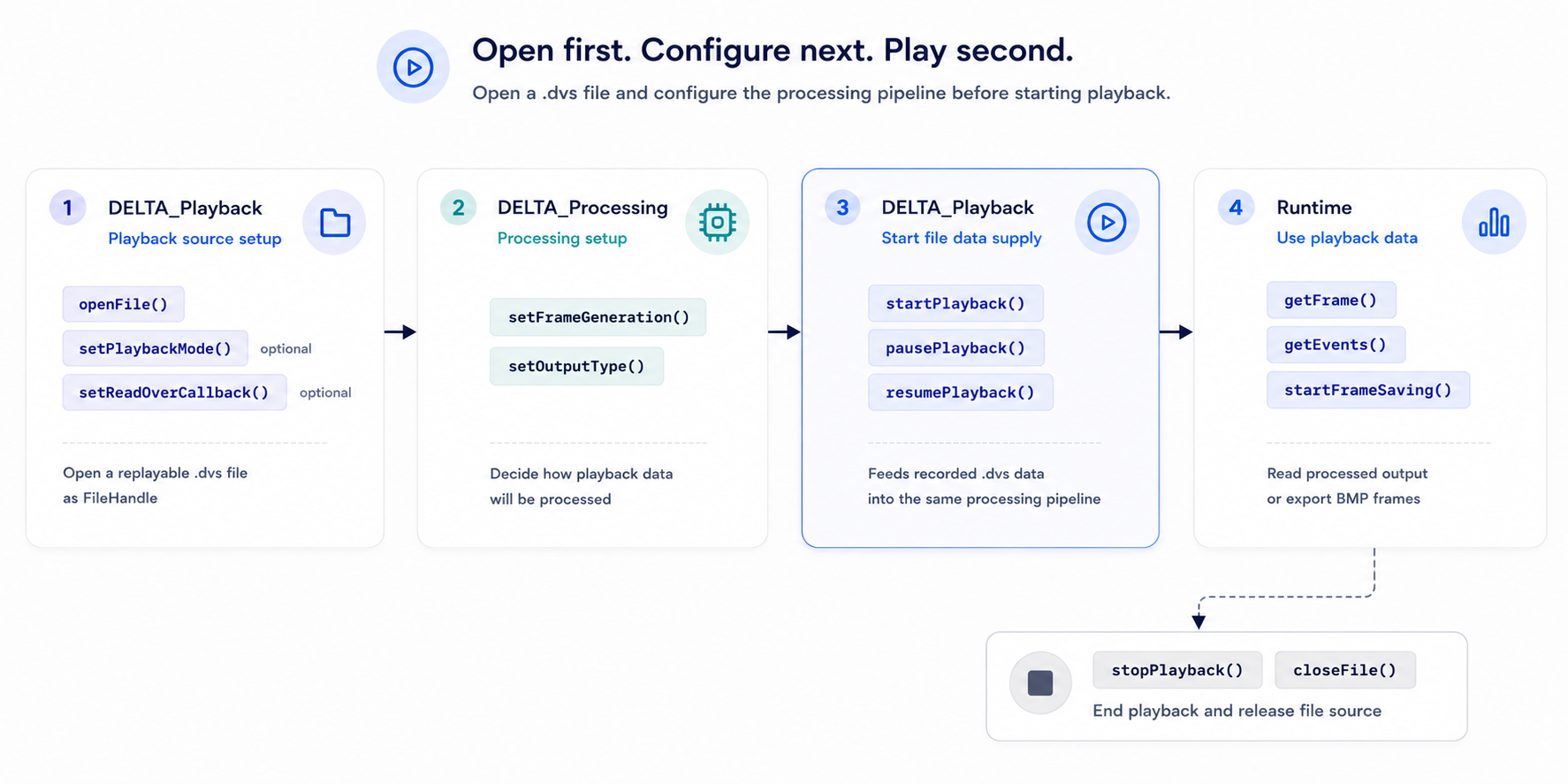
setReadOverCallback() registers a callback that is invoked when playback reaches the end of the file. It is most useful with PlaybackMode::Once, where playback stops after a single pass through the file.
Functions
| Function | Purpose |
|---|---|
openFile() |
Open a .dvs playback file and return a FileHandle. |
closeFile() |
Close an opened playback file and release SDK resources. |
startPlayback() |
Start playback from the opened file. |
pausePlayback() |
Pause playback while preserving the current file position. |
resumePlayback() |
Resume playback from the paused file position. |
stopPlayback() |
Stop playback and release playback pipeline resources. |
setPlaybackMode() |
Set playback to single-play or loop mode. |
getPlaybackMode() |
Read the current playback mode. |
setReadOverCallback() |
Register a callback called when single-play playback reaches the end of the file. |
Function reference
Status openFile(const char* filePath, FileHandle* handle);
Opens a .dvs file and writes a playback handle for later API calls.
Use when: Before starting playback or reading recorded data through processing APIs.
Parameters
| Name | Type | Direction | Description |
|---|---|---|---|
filePath |
const char* |
Input | Path to the .dvs file. |
handle |
FileHandle* |
Output | Opened playback file handle. |
Returns
| Value | Meaning |
|---|---|
Status::Success |
File opened successfully. |
| Error status | The file could not be opened. Pass the status to getStatusMessage() for details. |
Example
delta::FileHandle file = nullptr;

delta::Status status = delta::openFile("recordings/sample.dvs", &file);
if (status != delta::Status::Success) {
    std::cout << delta::getStatusMessage(status) << std::endl;
    return;
}
Status closeFile(FileHandle handle);
Closes an opened playback file and releases its SDK resources. If playback is active, it is stopped automatically before the file is closed.
Use when: After playback, processing, or file inspection is finished.
Parameters
| Name | Type | Direction | Description |
|---|---|---|---|
handle |
FileHandle |
Input | File handle returned by openFile(). |
Returns
| Value | Meaning |
|---|---|
Status::Success |
File closed successfully. |
| Error status | The file could not be closed. Pass the status to getStatusMessage() for details. |
Example
delta::closeFile(file);
file = nullptr;
Status startPlayback(FileHandle handle);
Starts playback from the opened .dvs file.
Use when: After openFile() has completed successfully and any playback mode has been configured.
Parameters
| Name | Type | Direction | Description |
|---|---|---|---|
handle |
FileHandle |
Input | File handle returned by openFile(). |
Returns
| Value | Meaning |
|---|---|
Status::Success |
Playback started successfully. |
| Error status | Playback could not be started. Pass the status to getStatusMessage() for details. |
Example
delta::Status status = delta::startPlayback(file);
if (status != delta::Status::Success) {
    std::cout << delta::getStatusMessage(status) << std::endl;
    return;
}
Status pausePlayback(FileHandle handle);
Pauses playback while preserving the current file position. After pausing, the internal frame buffer drains and processing APIs return Status::Error_NoData until playback resumes.
Use when: To temporarily stop playback without resetting the file position.
Parameters
| Name | Type | Direction | Description |
|---|---|---|---|
handle |
FileHandle |
Input | File handle returned by openFile(). |
Returns
| Value | Meaning |
|---|---|
Status::Success |
Playback paused successfully. |
| Error status | Playback could not be paused. Pass the status to getStatusMessage() for details. |
Example
delta::Status status = delta::pausePlayback(file);
if (status != delta::Status::Success) {
    std::cout << delta::getStatusMessage(status) << std::endl;
}
Status resumePlayback(FileHandle handle);
Resumes playback from the paused file position.
Use when: After pausePlayback() when the application is ready to continue reading recorded data.
Parameters
| Name | Type | Direction | Description |
|---|---|---|---|
handle |
FileHandle |
Input | File handle returned by openFile(). |
Returns
| Value | Meaning |
|---|---|
Status::Success |
Playback resumed successfully. |
| Error status | Playback could not be resumed. Pass the status to getStatusMessage() for details. |
Example
delta::Status status = delta::resumePlayback(file);
if (status != delta::Status::Success) {
    std::cout << delta::getStatusMessage(status) << std::endl;
}
Status stopPlayback(FileHandle handle);
Stops playback and releases playback pipeline resources.
Use when: After recorded data processing is complete, before closing the file or changing workflow state.
Parameters
| Name | Type | Direction | Description |
|---|---|---|---|
handle |
FileHandle |
Input | File handle returned by openFile(). |
Returns
| Value | Meaning |
|---|---|
Status::Success |
Playback stopped successfully. |
| Error status | Playback could not be stopped. Pass the status to getStatusMessage() for details. |
Example
delta::Status status = delta::stopPlayback(file);
if (status != delta::Status::Success) {
    std::cout << delta::getStatusMessage(status) << std::endl;
}
Status setPlaybackMode(FileHandle handle, PlaybackMode mode);
Sets file playback mode. Use PlaybackMode::Loop to replay the opened file repeatedly, or PlaybackMode::Once to play it one time. When PlaybackMode::Once is selected, register setReadOverCallback() if the application needs a callback when file playback reaches the end.
Use when: Before startPlayback() to choose whether playback runs once or loops continuously.
Parameters
| Name | Type | Direction | Description |
|---|---|---|---|
handle |
FileHandle |
Input | File handle returned by openFile(). |
mode |
PlaybackMode |
Input | Playback mode. Use PlaybackMode::Loop for repeated playback or PlaybackMode::Once for single playback. |
Returns
| Value | Meaning |
|---|---|
Status::Success |
Playback mode was updated successfully. |
| Error status | Playback mode could not be updated. Pass the status to getStatusMessage() for details. |
Example
delta::Status status = delta::setPlaybackMode(file, delta::PlaybackMode::Loop);
if (status != delta::Status::Success) {
    std::cout << delta::getStatusMessage(status) << std::endl;
}
Status getPlaybackMode(FileHandle handle, PlaybackMode* mode);
Gets the current file playback mode.
Use when: To inspect whether the opened file is configured for single-play or loop playback.
Parameters
| Name | Type | Direction | Description |
|---|---|---|---|
handle |
FileHandle |
Input | File handle returned by openFile(). |
mode |
PlaybackMode* |
Output | Current playback mode. |
Returns
| Value | Meaning |
|---|---|
Status::Success |
Playback mode was read successfully. |
| Error status | Playback mode could not be read. Pass the status to getStatusMessage() for details. |
Example
delta::PlaybackMode mode = delta::PlaybackMode::Once;
delta::Status status = delta::getPlaybackMode(file, &mode);
if (status != delta::Status::Success) {
    std::cout << delta::getStatusMessage(status) << std::endl;
}
Status setReadOverCallback(FileHandle handle,
                           ReadOverCallback callback,
                           void* userData);
Registers a callback that is called when single-play playback reaches the end of the file.
Use when: To be notified that PlaybackMode::Once playback has finished.
Parameters
| Name | Type | Direction | Description |
|---|---|---|---|
handle |
FileHandle |
Input | File handle returned by openFile(). |
callback |
ReadOverCallback |
Input | Callback function called with userData when playback reaches the file end. |
userData |
void* |
Input | User-defined pointer passed back to the callback. |
Returns
| Value | Meaning |
|---|---|
Status::Success |
Callback was registered successfully. |
| Error status | The callback could not be registered. Pass the status to getStatusMessage() for details. |
Example
void ReadOver_Cb(void* userData) {
    std::cout << "Playback finished." << std::endl;
}

delta::Status status = delta::setReadOverCallback(file, ReadOver_Cb, nullptr);
if (status != delta::Status::Success) {
    std::cout << delta::getStatusMessage(status) << std::endl;
}