DELTA_LiveStream
DELTA_LiveStream starts live data streaming after the camera connection has been completed through DELTA_Device and the required processing settings have been configured through DELTA_Processing. Configure the required settings before calling startStream() to get the expected behavior. For the recommended order, refer to the Typical flow in each module. If the required settings are not configured, data may not be received or the SDK may run with default settings.
Back to API overview.
Typical flow
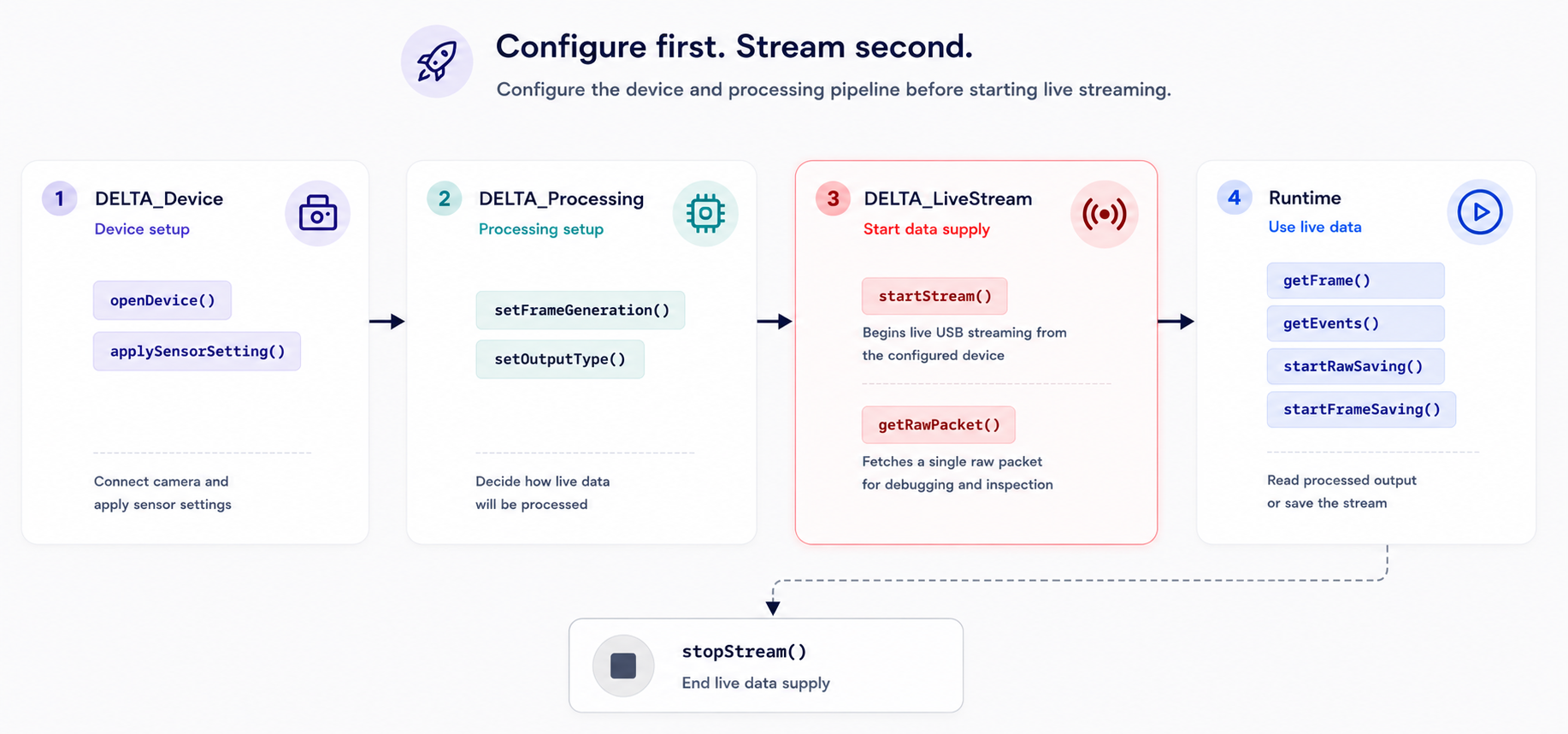
Functions
| Function | Purpose |
|---|---|
startStream() |
Start live streaming from an opened Delta series camera. |
stopStream() |
Stop live streaming for an opened camera. |
getRawPacket() |
Read one raw USB packet from the opened camera. |
setDataRateCallback() |
Register a callback that receives USB data rate updates in KB/s. |
setFrameRateCallback() |
Register a callback that receives generated frame rate updates in FPS. |
Function reference
Status startStream(DeviceHandle handle);
Starts live USB streaming for an opened Delta series camera.
Use when: After DELTA_Device has completed openDevice() and applySensorSetting(), and after DELTA_Processing has configured the frame generation option and required output settings.
Parameters
| Name | Type | Direction | Description |
|---|---|---|---|
handle |
DeviceHandle |
Input | Device handle returned by openDevice(). |
Returns
| Value | Meaning |
|---|---|
Status::Success |
Streaming started successfully. |
| Error status | Streaming could not be started. Pass the status to getStatusMessage() for details. |
Example
// DELTA_Device setup
std::int32_t deviceCount = 0; // Number of detected Delta series cameras.
delta::DeviceHandle device = nullptr; // Handle used to control the selected camera.

delta::scanDevices(&deviceCount); // Scan connected cameras.
delta::openDevice(0, &device); // Open the first camera from the scan result.
delta::applySensorSetting(device, "settings/Delta_10_2000FPS_Single.txt"); // Apply a camera setting file.

// DELTA_Processing setup
delta::setFrameGeneration(device, delta::frameEndBased(33)); // Configure how frames are generated.

std::uint32_t size = delta::getColorFrameBufferSize(device); // Get the required color frame buffer size.
std::vector<std::uint8_t> buffer(size); // Allocate caller-owned frame memory.

delta::ColorFrame frame{}; // Output structure filled by getColorFrame().
frame.startAddress = buffer.data(); // Point the output structure to the buffer.
frame.bufferSize = size; // Tell the SDK how many bytes are available.

delta::Status status = delta::startStream(device); // Start live streaming after setup is complete.

if (status != delta::Status::Success) {
    std::cout << delta::getStatusMessage(status) << std::endl;
    return;
}

delta::getColorFrame(device, &frame, 0); // Read one generated frame after streaming starts.
Status stopStream(DeviceHandle handle);
Stops the SDK from retrieving data over USB from an opened Delta series camera. This stops USB data acquisition in the SDK; it does not mean that the sensor itself stops generating data.
Use when: After live USB acquisition is finished, before closing the device.
Parameters
| Name | Type | Direction | Description |
|---|---|---|---|
handle |
DeviceHandle |
Input | Device handle returned by openDevice(). |
Returns
| Value | Meaning |
|---|---|
Status::Success |
Streaming stopped successfully. |
| Error status | Streaming could not be stopped. Pass the status to getStatusMessage() for details. |
Example
delta::Status status = delta::stopStream(device);
if (status != delta::Status::Success) {
    std::cout << delta::getStatusMessage(status) << std::endl;
}
Status getRawPacket(DeviceHandle handle,
                    std::uint8_t* buffer,
                    std::uint32_t bufferSize,
                    std::uint32_t* readSize);
Reads one raw USB packet from the opened Delta series camera.
Use when: To access raw packet data directly instead of using higher-level processing outputs.
Parameters
| Name | Type | Direction | Description |
|---|---|---|---|
handle |
DeviceHandle |
Input | Device handle returned by openDevice(). |
buffer |
std::uint8_t* |
Output | Buffer that receives raw USB packet data. |
bufferSize |
std::uint32_t |
Input | Size of buffer in bytes. |
readSize |
std::uint32_t* |
Output | Number of bytes read into buffer. |
Returns
| Value | Meaning |
|---|---|
Status::Success |
Raw packet data was read successfully. |
| Error status | The raw packet could not be read. Pass the status to getStatusMessage() for details. |
Example
std::vector<std::uint8_t> buffer(4096);
std::uint32_t readSize = 0;

delta::Status status = delta::getRawPacket(
    device,
    buffer.data(),
    static_cast<std::uint32_t>(buffer.size()),
    &readSize
);

if (status != delta::Status::Success) {
    std::cout << delta::getStatusMessage(status) << std::endl;
}
Status setDataRateCallback(DeviceHandle handle,
                           DataRateCallback callback,
                           void* userData);
Registers a user-defined callback that receives live USB data rate updates in KB/s. Define a function with the DataRateCallback signature, then pass that function pointer to setDataRateCallback(). The application does not call the callback directly; the SDK calls it automatically from an internal thread.
void callback(void* userData, double kilobytesPerSecond);
Use when: To monitor USB throughput while live streaming is running.
Parameters
| Name | Type | Direction | Description |
|---|---|---|---|
handle |
DeviceHandle |
Input | Device handle returned by openDevice(). |
callback |
DataRateCallback |
Input | User-defined callback function pointer called with userData and kilobytesPerSecond. |
userData |
void* |
Input | User-defined pointer passed back to the callback. |
Returns
| Value | Meaning |
|---|---|
Status::Success |
Callback was registered successfully. |
| Error status | The callback could not be registered. Pass the status to getStatusMessage() for details. |
Example
void DataRate_Cb(void* userData, double kilobytesPerSecond) {
    std::cout << "USB data rate: " << kilobytesPerSecond << " KB/s" << std::endl;
}

delta::Status status = delta::setDataRateCallback(device, DataRate_Cb, nullptr);
if (status != delta::Status::Success) {
    std::cout << delta::getStatusMessage(status) << std::endl;
}
Status setFrameRateCallback(DeviceHandle handle,
                            FrameRateCallback callback,
                            void* userData);
Registers a user-defined callback that receives generated frame rate updates in FPS. Define a function with the FrameRateCallback signature, then pass that function pointer to setFrameRateCallback(). The application does not call the callback directly; the SDK calls it automatically from an internal thread.
void callback(void* userData, std::int32_t framesPerSecond);
Use when: To monitor generated frame throughput while processing live stream data.
Parameters
| Name | Type | Direction | Description |
|---|---|---|---|
handle |
DeviceHandle |
Input | Device handle returned by openDevice(). |
callback |
FrameRateCallback |
Input | User-defined callback function pointer called with userData and framesPerSecond. |
userData |
void* |
Input | User-defined pointer passed back to the callback. |
Returns
| Value | Meaning |
|---|---|
Status::Success |
Callback was registered successfully. |
| Error status | The callback could not be registered. Pass the status to getStatusMessage() for details. |
Example
void FrameRate_Cb(void* userData, std::int32_t framesPerSecond) {
    std::cout << "Frame rate: " << framesPerSecond << " FPS" << std::endl;
}

delta::Status status = delta::setFrameRateCallback(device, FrameRate_Cb, nullptr);
if (status != delta::Status::Success) {
    std::cout << delta::getStatusMessage(status) << std::endl;
}
Callbacks are invoked from an internal SDK thread. Keep callback implementations thread-safe and avoid blocking SDK calls inside callbacks.