DELTA_Processing
DELTA_Processing converts data from an input source into application-ready outputs. The input source can be a DeviceHandle opened by openDevice() for live streaming from a Delta series camera, or a FileHandle opened by openFile() for playback from a saved .dvs file. Functions in this module accept that handle through the common InputSource* type, so the same calls work whether the underlying handle is a DeviceHandle or a FileHandle.
This module mainly controls two things: how events are grouped into one generated frame, and which output format the application reads from that generated data. Frame generation can be based on sensor frame-end packets with frameEndBased(), elapsed time with timeBased(), or event count with eventCountBased().
Event output functions such as getClassicEvents() and getCompactEvents() return only the events that occurred in the generated frame. Frame output functions such as getColorFrame(), getPolarityFrame(), and getTimestampFrame() return full-resolution per-pixel output for the entire frame. See the Typical flow and Function reference sections for detailed usage.
Back to API overview.
Typical flow
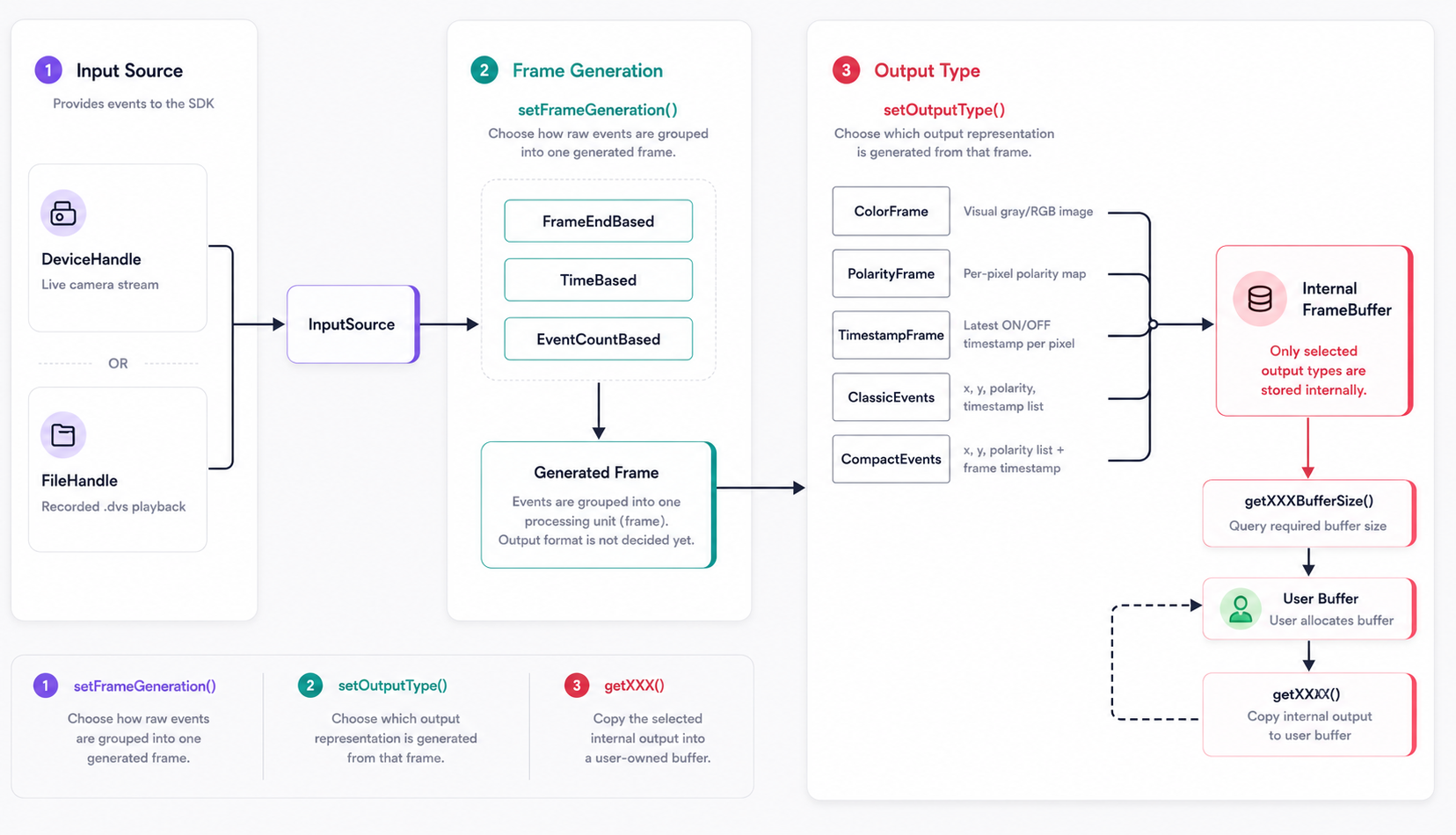
Before calling startStream() or startPlayback(), the application chooses how incoming events are grouped into one generated frame and which output format will deliver event or frame data. Once data supply begins, processed results flow into the application's buffer in that selected format.
Functions
| Function | Purpose |
|---|---|
getInputSourceType() |
Read whether a source was opened from a Delta series camera or a file. |
frameEndBased() |
Create a frame generation setting based on frame-end packet count. |
timeBased() |
Create a frame generation setting based on elapsed time. |
eventCountBased() |
Create a frame generation setting based on event count. |
setFrameGeneration() |
Set how raw events are grouped into generated outputs. |
getFrameGeneration() |
Read the current frame generation setting. |
setOutputType() |
Select which processed output types are generated internally. |
getOutputType() |
Read the currently enabled output type setting. |
setColorFormat() |
Set grayscale or RGB output for getColorFrame(). |
getColorFormat() |
Read the current color frame output format. |
setColor() |
Set ON, OFF, and no-event colors for getColorFrame(). |
getColor() |
Read the current ON, OFF, and no-event colors. |
getColorFrame() |
Read one rendered color frame. |
getColorFrameBufferSize() |
Read the required color frame buffer size in bytes. |
getPolarityFrame() |
Read one per-pixel polarity frame. |
getPolarityFrameBufferSize() |
Read the required polarity frame buffer size in bytes. |
getTimestampFrame() |
Read one per-pixel ON/OFF timestamp frame. |
getTimestampFrameBufferSize() |
Read the required timestamp buffer size in bytes. |
getClassicEvents() |
Read parsed events with x, y, polarity, and timestamp. |
getCompactEvents() |
Read parsed events in the compact RC1S event format. |
setEventCountCallback() |
Register a callback that receives total parsed event count. |
setFrameCountCallback() |
Register a callback that receives total parsed frame-end count. |
Function reference
Status getInputSourceType(InputSource* handle, InputSourceType* type);
Gets whether an input source was opened from a file or a Delta series camera.
Use when: To branch processing behavior based on whether the source is live or playback.
Parameters
| Name | Type | Direction | Description |
|---|---|---|---|
handle |
InputSource* |
Input | Input source handle returned by openDevice() or openFile(). |
type |
InputSourceType* |
Output | Receives InputSourceType::Device or InputSourceType::File. |
Returns
| Value | Meaning |
|---|---|
Status::Success |
Source type was read successfully. |
| Error status | Source type could not be read. Pass the status to getStatusMessage() for details. |
Example
delta::InputSourceType type{};
delta::Status status = delta::getInputSourceType(source, &type);
if (status != delta::Status::Success) {
    std::cout << delta::getStatusMessage(status) << std::endl;
}
FrameGeneration frameEndBased(std::int32_t frameEndCount);
Creates a frame generation setting that produces one output after a number of sensor frame-end packets. Delta series DVS sensors generate a frame-end packet whenever one sensor frame is completed, and this mode accumulates a selected number of those sensor frames into one generated output frame.
Use when: To follow the sensor frame boundary and generate display-friendly output. For example, with a 2000 FPS sensor setting, accumulating 33 frame-end packets produces about 60 generated frames per second, which matches common display refresh rates well.
Parameters
| Name | Type | Direction | Description |
|---|---|---|---|
frameEndCount |
std::int32_t |
Input | Number of sensor frame-end packets accumulated into one generated frame. |
Returns
| Value | Meaning |
|---|---|
FrameGeneration |
Frame generation setting for frame-end based processing. |
Example
delta::FrameGeneration generation = delta::frameEndBased(33);
delta::setFrameGeneration(source, generation);
FrameGeneration timeBased(std::int32_t framePeriodMs);
Creates a frame generation setting that accumulates incoming events for a fixed time period and then produces one generated frame.
Use when: To generate frames at a time-based interval, such as one frame every 16 ms.
Parameters
| Name | Type | Direction | Description |
|---|---|---|---|
framePeriodMs |
std::int32_t |
Input | Frame generation period in milliseconds. |
Returns
| Value | Meaning |
|---|---|
FrameGeneration |
Frame generation setting for time based processing. |
Example
delta::FrameGeneration generation = delta::timeBased(16);
delta::setFrameGeneration(source, generation);
FrameGeneration eventCountBased(std::int32_t eventsPerFrame);
Creates a frame generation setting that produces one generated frame after a fixed number of events.
Use when: To control how many events are included in each generated frame. If eventsPerFrame is set too small, one visual frame may be split across multiple generated frames and the output can look clipped or incomplete.
Parameters
| Name | Type | Direction | Description |
|---|---|---|---|
eventsPerFrame |
std::int32_t |
Input | Target number of events accumulated into one generated frame. |
Returns
| Value | Meaning |
|---|---|
FrameGeneration |
Frame generation setting for event-count based processing. |
Example
delta::FrameGeneration generation = delta::eventCountBased(10000);
delta::setFrameGeneration(source, generation);
Status setFrameGeneration(InputSource* handle,
                          FrameGeneration generation);
Applies a selected FrameGeneration setting to the specified input source.
Use when: After choosing one of the frame generation options described above.
Parameters
| Name | Type | Direction | Description |
|---|---|---|---|
handle |
InputSource* |
Input | Input source handle returned by openDevice() or openFile(). |
generation |
FrameGeneration |
Input | Frame generation mode and parameter. |
Returns
| Value | Meaning |
|---|---|
Status::Success |
Frame generation setting was updated successfully. |
| Error status | The setting could not be updated. Pass the status to getStatusMessage() for details. |
Example
// Frame-end based: accumulate 33 sensor frame-end packets into one generated frame.
delta::setFrameGeneration(source, delta::frameEndBased(33));

// Time based: accumulate events for 16 ms into one generated frame.
delta::setFrameGeneration(source, delta::timeBased(16));

// Event-count based: accumulate 10000 events into one generated frame.
delta::setFrameGeneration(source, delta::eventCountBased(10000));
Status getFrameGeneration(InputSource* handle,
                          FrameGeneration* generation);
Gets the current frame generation mode and parameter.
Use when: To inspect the active output generation setting.
Parameters
| Name | Type | Direction | Description |
|---|---|---|---|
handle |
InputSource* |
Input | Input source handle returned by openDevice() or openFile(). |
generation |
FrameGeneration* |
Output | Current frame generation mode and parameter. |
Returns
| Value | Meaning |
|---|---|
Status::Success |
Frame generation setting was read successfully. |
| Error status | The setting could not be read. Pass the status to getStatusMessage() for details. |
Example
delta::FrameGeneration generation{};
delta::getFrameGeneration(source, &generation);
Status setOutputType(InputSource* handle, OutputType outputType);
Selects which processed output types are generated and stored internally from each generated frame.
By default, the SDK uses OutputType::All, so all output formats are generated internally. If the application only needs one format, such as ColorFrame, call setOutputType() before startStream() or startPlayback() to avoid generating unused outputs.
Multiple output types can be combined with the bitwise OR operator.
Use when: To reduce unnecessary processing overhead by generating only the output format needed by the application.
Parameters
| Name | Type | Direction | Description |
|---|---|---|---|
handle |
InputSource* |
Input | Input source handle returned by openDevice() or openFile(). |
outputType |
OutputType |
Input | Output type flags to enable. |
Output types
| Value | Generated output |
|---|---|
OutputType::ColorFrame |
Rendered grayscale or RGB image frame. |
OutputType::PolarityFrame |
Per-pixel polarity map for the generated frame. |
OutputType::TimestampFrame |
Per-pixel latest ON/OFF timestamp maps. |
OutputType::ClassicEvents |
Event list with x, y, polarity, and timestamp. |
OutputType::CompactEvents |
Compact event list with x, y, polarity, and one frame timestamp. |
OutputType::All |
Enables all output types. This is the default setting. |
Returns
| Value | Meaning |
|---|---|
Status::Success |
Output type setting was updated successfully. |
| Error status | The output type could not be updated. Pass the status to getStatusMessage() for details. |
Example
// Generate only color frames internally.
delta::setOutputType(source, delta::OutputType::ColorFrame);

// Generate color frames and compact events internally.
delta::setOutputType(
    source,
    delta::OutputType::ColorFrame | delta::OutputType::CompactEvents
);
Status getOutputType(InputSource* handle, OutputType* outputType);
Gets the currently enabled output type setting.
Use when: To verify which processed output types are currently generated internally.
Parameters
| Name | Type | Direction | Description |
|---|---|---|---|
handle |
InputSource* |
Input | Input source handle returned by openDevice() or openFile(). |
outputType |
OutputType* |
Output | Receives the currently enabled output type flags. |
Returns
| Value | Meaning |
|---|---|
Status::Success |
Output type setting was read successfully. |
| Error status | The output type could not be read. Pass the status to getStatusMessage() for details. |
Example
delta::OutputType outputType = delta::OutputType::All;
delta::getOutputType(source, &outputType);
Status setColorFormat(InputSource* handle, ColorFormat format);
Sets the output format used by getColorFrame(). ColorFormat::Gray uses one byte per pixel, and ColorFormat::RGB uses three bytes per pixel.
Use when: Before allocating color frame memory or before changing rendered output format.
Parameters
| Name | Type | Direction | Description |
|---|---|---|---|
handle |
InputSource* |
Input | Input source handle returned by openDevice() or openFile(). |
format |
ColorFormat |
Input | Color frame output format. Use ColorFormat::Gray or ColorFormat::RGB. |
Returns
| Value | Meaning |
|---|---|
Status::Success |
Color format was updated successfully. |
| Error status | Color format could not be updated. Pass the status to getStatusMessage() for details. |
Example
delta::Status status = delta::setColorFormat(source, delta::ColorFormat::RGB);
if (status != delta::Status::Success) {
    std::cout << delta::getStatusMessage(status) << std::endl;
}
Status getColorFormat(InputSource* handle, ColorFormat* format);
Gets the current output format used by getColorFrame().
Use when: To inspect whether color frames are generated in grayscale or RGB format.
Parameters
| Name | Type | Direction | Description |
|---|---|---|---|
handle |
InputSource* |
Input | Input source handle returned by openDevice() or openFile(). |
format |
ColorFormat* |
Output | Current color frame output format. |
Returns
| Value | Meaning |
|---|---|
Status::Success |
Color format was read successfully. |
| Error status | Color format could not be read. Pass the status to getStatusMessage() for details. |
Example
delta::ColorFormat format = delta::ColorFormat::Gray;
delta::getColorFormat(source, &format);
Status setColor(InputSource* handle, const EventColor* color);
Sets the colors used by getColorFrame() for ON, OFF, and no-event pixels.
Use when: To override the default colors selected by setColorFormat().
Parameters
| Name | Type | Direction | Description |
|---|---|---|---|
handle |
InputSource* |
Input | Input source handle returned by openDevice() or openFile(). |
color |
const EventColor* |
Input | ON, OFF, and no-event colors. |
Returns
| Value | Meaning |
|---|---|
Status::Success |
Event colors were updated successfully. |
| Error status | Event colors could not be updated. Pass the status to getStatusMessage() for details. |
Example
delta::EventColor color{};
color.onEvent = {255, 0, 0};
color.offEvent = {0, 0, 255};
color.noEvent = {255, 255, 255};

delta::setColor(source, &color);
Status getColor(InputSource* handle, EventColor* color);
Gets the current ON, OFF, and no-event colors used by getColorFrame().
Use when: To inspect the active rendered event colors.
Parameters
| Name | Type | Direction | Description |
|---|---|---|---|
handle |
InputSource* |
Input | Input source handle returned by openDevice() or openFile(). |
color |
EventColor* |
Output | Current event colors. |
Returns
| Value | Meaning |
|---|---|
Status::Success |
Event colors were read successfully. |
| Error status | Event colors could not be read. Pass the status to getStatusMessage() for details. |
Example
delta::EventColor color{};
delta::getColor(source, &color);
Status getColorFrame(InputSource* handle,
                     ColorFrame* output,
                     std::int32_t cameraIndex);
Converts generated event data into an image-ready color frame. Use setColorFormat() and setColor() to control how ON events, OFF events, and no-event pixels are mapped into the output image.
Use when: To display or process event data as a grayscale or RGB image. ColorFormat::Gray produces a single-channel 8-bit buffer, and ColorFormat::RGB produces a three-channel 24-bit RGB buffer. These layouts can be wrapped by image-processing libraries such as OpenCV, for example as CV_8UC1 or CV_8UC3. When displaying RGB output with OpenCV, convert it to BGR first if the display function expects OpenCV's default BGR channel order.
Parameters
| Name | Type | Direction | Description |
|---|---|---|---|
handle |
InputSource* |
Input | Input source handle returned by openDevice() or openFile(). |
output |
ColorFrame* |
Output | Receives one rendered image frame. The caller owns startAddress and must allocate it for the selected color format. |
cameraIndex |
std::int32_t |
Input | Camera index. Use 0 for single camera devices. |
Returns
| Value | Meaning |
|---|---|
Status::Success |
Color frame was read successfully. |
| Error status | Color frame could not be read. Pass the status to getStatusMessage() for details. |
Example
std::uint32_t size = delta::getColorFrameBufferSize(source);
std::vector<std::uint8_t> buffer(size);

delta::ColorFrame frame{};
frame.startAddress = buffer.data();
frame.bufferSize = size;

delta::Status status = delta::getColorFrame(source, &frame, 0);

if (status == delta::Status::Success) {
    if (frame.colorFormat == delta::ColorFormat::Gray) {
        cv::Mat image(frame.header.height, frame.header.width, CV_8UC1, frame.startAddress);
        cv::imshow("DELTA Color Frame", image);
    } else {
        cv::Mat rgb(frame.header.height, frame.header.width, CV_8UC3, frame.startAddress);
        cv::Mat bgr;
        cv::cvtColor(rgb, bgr, cv::COLOR_RGB2BGR);
        cv::imshow("DELTA Color Frame", bgr);
    }
}
std::uint32_t getColorFrameBufferSize(InputSource* handle);
Gets the required ColorFrame::bufferSize value in bytes for the current sensor resolution and color format. In ColorFormat::Gray, this returns the buffer size for a single-channel 8-bit frame. In ColorFormat::RGB, this returns the buffer size for a three-channel 24-bit frame.
Use when: Before allocating ColorFrame::startAddress, especially after changing the color format with setColorFormat().
Parameters
| Name | Type | Direction | Description |
|---|---|---|---|
handle |
InputSource* |
Input | Input source handle returned by openDevice() or openFile(). |
Returns
| Value | Meaning |
|---|---|
| Byte count | Required ColorFrame buffer size. |
0 |
The handle is invalid or the required size is unavailable. |
Example
std::uint32_t size = delta::getColorFrameBufferSize(source);
Status getPolarityFrame(InputSource* handle,
                        PolarityFrame* output,
                        std::int32_t cameraIndex);
Gets one per-pixel polarity frame generated from the current frame generation option. Each pixel is mapped to an ON, OFF, or no-event polarity state. If no event occurred at a pixel in the generated frame, that pixel is mapped to the no-event value.
Use when: To retrieve the latest ON/OFF/no-event state for every pixel in a generated frame.
Parameters
| Name | Type | Direction | Description |
|---|---|---|---|
handle |
InputSource* |
Input | Input source handle returned by openDevice() or openFile(). |
output |
PolarityFrame* |
Output | Receives polarity frame data. The caller owns startAddress. |
cameraIndex |
std::int32_t |
Input | Camera index. Use 0 for single camera devices. |
Returns
| Value | Meaning |
|---|---|
Status::Success |
Polarity frame was read successfully. |
| Error status | Polarity frame could not be read. Pass the status to getStatusMessage() for details. |
Example
std::uint32_t size = delta::getPolarityFrameBufferSize(source);
std::vector<std::int8_t> buffer(size);

delta::PolarityFrame frame{};
frame.startAddress = buffer.data();
frame.bufferSize = size;

delta::Status status = delta::getPolarityFrame(source, &frame, 0);
std::uint32_t getPolarityFrameBufferSize(InputSource* handle);
Gets the required PolarityFrame::bufferSize value in bytes for the current sensor resolution.
Use when: Before allocating PolarityFrame::startAddress.
Parameters
| Name | Type | Direction | Description |
|---|---|---|---|
handle |
InputSource* |
Input | Input source handle returned by openDevice() or openFile(). |
Returns
| Value | Meaning |
|---|---|
| Byte count | Required PolarityFrame buffer size. |
0 |
The handle is invalid or the required size is unavailable. |
Example
std::uint32_t size = delta::getPolarityFrameBufferSize(source);
Status getTimestampFrame(InputSource* handle,
                         TimestampFrame* output,
                         std::int32_t cameraIndex);
Gets one per-pixel timestamp frame generated from the current frame generation option. The output stores the latest ON event timestamp and the latest OFF event timestamp for each pixel in separate buffers. A value of 0 means that no timestamp is stored for that pixel.
Use when: To retrieve per-pixel ON/OFF timestamp maps or to build time-surface style representations.
Parameters
| Name | Type | Direction | Description |
|---|---|---|---|
handle |
InputSource* |
Input | Input source handle returned by openDevice() or openFile(). |
output |
TimestampFrame* |
Output | Receives timestamp frame data. The caller owns onEvent and offEvent. |
cameraIndex |
std::int32_t |
Input | Camera index. Use 0 for single camera devices. |
Returns
| Value | Meaning |
|---|---|
Status::Success |
Timestamp frame was read successfully. |
| Error status | Timestamp frame could not be read. Pass the status to getStatusMessage() for details. |
Example
std::uint32_t size = delta::getTimestampFrameBufferSize(source);
std::vector<std::uint32_t> on(size / sizeof(std::uint32_t));
std::vector<std::uint32_t> off(size / sizeof(std::uint32_t));

delta::TimestampFrame frame{};
frame.onEvent = on.data();
frame.offEvent = off.data();
frame.bufferSize = size;

delta::Status status = delta::getTimestampFrame(source, &frame, 0);
std::uint32_t getTimestampFrameBufferSize(InputSource* handle);
Gets the required TimestampFrame::bufferSize value in bytes for each timestamp array.
Use when: Before allocating TimestampFrame::onEvent and TimestampFrame::offEvent.
Parameters
| Name | Type | Direction | Description |
|---|---|---|---|
handle |
InputSource* |
Input | Input source handle returned by openDevice() or openFile(). |
Returns
| Value | Meaning |
|---|---|
| Byte count | Required size for each timestamp array. |
0 |
The handle is invalid or the required size is unavailable. |
Example
std::uint32_t size = delta::getTimestampFrameBufferSize(source);
Status getClassicEvents(InputSource* handle,
                        ClassicEventList* output,
                        std::int32_t cameraIndex);
Implements the conventional DVS event representation. Instead of returning data for every pixel on the sensor, this function returns only the pixels where an event occurred, with each event expressed as [x, y, polarity, timestamp] — provided for compatibility with existing systems.
Use when: You need compatibility with existing systems that expect the classic DVS format. For a more efficient representation, use getCompactEvents().
Parameters
| Name | Type | Direction | Description |
|---|---|---|---|
handle |
InputSource* |
Input | Input source handle returned by openDevice() or openFile(). |
output |
ClassicEventList* |
Output | Receives event data for one camera. The caller owns events. |
cameraIndex |
std::int32_t |
Input | Camera index. Use 0 for single camera devices. |
Returns
| Value | Meaning |
|---|---|
Status::Success |
Classic events were read successfully. |
| Error status | Events could not be read. Pass the status to getStatusMessage() for details. |
Example
std::vector<delta::ClassicEvent> events(DELTA_DEFAULT_EVENT_CAPACITY);

delta::ClassicEventList list{};
list.events = events.data();
list.eventCapacity = static_cast<std::int32_t>(events.size());

delta::Status status = delta::getClassicEvents(source, &list, 0);
Status getCompactEvents(InputSource* handle,
                        CompactEventList* output,
                        std::int32_t cameraIndex);
Implements an event format unique to our sensor. In the conventional format, each event carries its own timestamp ([x, y, polarity, timestamp]), which duplicates the timestamp across every event and is inefficient. Our sensor instead generates a single timestamp per frame — all events produced within that frame share the one timestamp — so individual events no longer carry timestamp data, only packed x, y, and polarity information. This shared timestamp is exposed as CompactEventList::frameTimestamp.
Parameters
| Name | Type | Direction | Description |
|---|---|---|---|
handle |
InputSource* |
Input | Input source handle returned by openDevice() or openFile(). |
output |
CompactEventList* |
Output | Receives compact event data for one camera. The caller owns events. |
cameraIndex |
std::int32_t |
Input | Camera index. Use 0 for single camera devices. |
Returns
| Value | Meaning |
|---|---|
Status::Success |
Compact events were read successfully. |
| Error status | Events could not be read. Pass the status to getStatusMessage() for details. |
Example
std::vector<delta::CompactEvent> events(DELTA_DEFAULT_EVENT_CAPACITY);

delta::CompactEventList list{};
list.events = events.data();
list.eventCapacity = static_cast<std::int32_t>(events.size());

delta::Status status = delta::getCompactEvents(source, &list, 0);
Status setEventCountCallback(InputSource* handle,
                             EventCountCallback callback,
                             void* userData);
Registers a user-defined callback that receives the total parsed event count approximately once per second while events are parsed from a live stream or playback file. Define a function with the EventCountCallback signature, then pass that function pointer to setEventCountCallback(). The application does not call the callback directly; the SDK calls it automatically from an internal thread.
void callback(void* userData, std::uint64_t totalEvents);
Use when: To monitor total event throughput during processing.
Parameters
| Name | Type | Direction | Description |
|---|---|---|---|
handle |
InputSource* |
Input | Input source handle returned by openDevice() or openFile(). |
callback |
EventCountCallback |
Input | Callback function called with userData and totalEvents. |
userData |
void* |
Input | User-defined pointer passed back to the callback. |
Returns
| Value | Meaning |
|---|---|
Status::Success |
Callback was registered successfully. |
| Error status | Callback could not be registered. Pass the status to getStatusMessage() for details. |
Example
void EventCount_Cb(void* userData, std::uint64_t totalEvents) {
    std::cout << "Events: " << totalEvents << std::endl;
}

delta::setEventCountCallback(source, EventCount_Cb, nullptr);
Status setFrameCountCallback(InputSource* handle,
                             FrameCountCallback callback,
                             void* userData);
Registers a user-defined callback that receives the total parsed frame-end count approximately once per second while events are parsed from a live stream or playback file. Define a function with the FrameCountCallback signature, then pass that function pointer to setFrameCountCallback(). The application does not call the callback directly; the SDK calls it automatically from an internal thread.
void callback(void* userData, std::uint64_t totalFrames);
Use when: To monitor parsed frame-end packet count during processing.
Parameters
| Name | Type | Direction | Description |
|---|---|---|---|
handle |
InputSource* |
Input | Input source handle returned by openDevice() or openFile(). |
callback |
FrameCountCallback |
Input | Callback function called with userData and totalFrames. |
userData |
void* |
Input | User-defined pointer passed back to the callback. |
Returns
| Value | Meaning |
|---|---|
Status::Success |
Callback was registered successfully. |
| Error status | Callback could not be registered. Pass the status to getStatusMessage() for details. |
Example
void FrameCount_Cb(void* userData, std::uint64_t totalFrames) {
    std::cout << "Frame-end packets: " << totalFrames << std::endl;
}

delta::setFrameCountCallback(source, FrameCount_Cb, nullptr);
Callbacks are invoked from an internal SDK thread. Keep callback implementations thread-safe and avoid blocking SDK calls inside callbacks.