External Clock
Supported on DELTA-10. The camera uses a 24 MHz internal reference clock, so a 24 MHz external reference is recommended. Other supported frequencies can also be used with matching clock and timing settings.
Connect an external reference
Connect the source to M8 pin 5, External Clock In. See Camera Interfaces for the genuine NRV cable mapping.
| Signal-generator setting | Value |
|---|---|
| Amplitude | 1.8 V peak-to-peak: 0–1.8 V |
| Offset | 0.9 V |
| Frequency | 24 MHz recommended, matching the internal reference |
| Duty cycle | 50% |
| Waveform | Square wave |
Select the clock source
- Supply the external reference before switching clocks. Use 24 MHz to keep the existing clock configuration.
- In DVS Viewer, open Sensor Settings → Clock source.
- Click External and confirm the switch. The status changes to Running on external clock.
Sensor Settings · Clock source
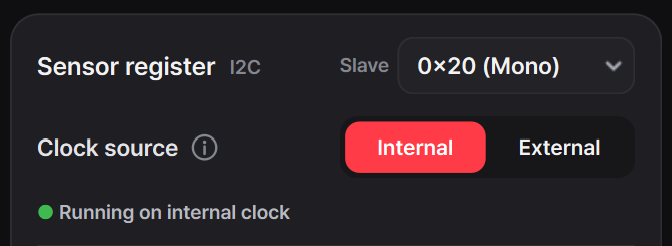
With a 24 MHz external reference, the existing camera configuration can be used unchanged. If using a different frequency, adjust the clock, capture timing, and timestamp conversion for that frequency. This replaces the reference clock; it is not the external-trigger input.
Keep the clock supplied
Without a valid external clock, the image may stop or the sensor may not operate correctly. Select Internal before disconnecting the external source.